Technical SEO
To be brutally honest: ranking high in Google will never happen if your website isn’t technically sound. Loading speed, the clarity of your architecture, responsiveness for larger and smaller screens… These are all technical SEO factors that either make things easier or harder for your visitor, and which search engines take into account.
Cold feet? No need. After reading this extensive white paper, you’ll be able to get started smoothly yourself with your own website’s technical SEO. You can get the first challenges delivered straight to your inbox by requesting our free SEO scan. Good luck!
Tip
Download our SEO checklist at the bottom of this page.
With technical SEO, you improve the technical aspects of your website. This makes it more user-friendly for your visitors and helps it rank higher in search engine results. Because the better your website answers the searcher’s questions, the more Google likes to show it in the SERP.
So, what does technical SEO involve? Simply put, it’s about ensuring the various elements of your website fit together logically. This results in a fast, scannable, and understandable website.
For example, it helps to submit your sitemap to Google, set up an SEO-friendly architecture, and detect and change duplicate content. You’ll learn about this and much more in this white paper, including several to-dos – small adjustments that really make a big difference (while SEO remains a long-term strategy, of course).
![Technische SEO: Wat is het & hoe werkt het? [Webinar]](https://i.ytimg.com/vi/KXcDVtrh5EA/hqdefault.jpg)
Search engines like Google evaluate websites based on hundreds of factors. These are constantly adjusted and fine-tuned so that search results provide the best possible answer for every query. Three essential pillars always remain: technology, content, and authority.
The order of these pillars is no coincidence. Technology comes first because it forms the foundation of SEO. Is it a mess behind the scenes (literally and figuratively)? Then the chance of ending up at the top of the search results is zero. This causes your number of organic visitors, leads, and revenue to shrink.
Feel free to compare SEO to a car. No matter how much it shines on the outside or how flashy it looks, if it doesn’t drive, it just stays in the garage. It’s a waste to invest money in something that looks good but doesn’t work well.
Technical SEO is the first pillar, the starting point of SEO. Especially for large websites, such as a webshop with tens of thousands of products, it is a major challenge. After all, when the foundation isn’t solid enough, all other efforts make little sense.
Fortunately, technical SEO is “set and forget” – or even better, “set and remember“. Is everything set up correctly? Then you can calmly continue building your content and authority. The first page of the search engines is already coming into view.
In the meantime, you continue to monitor your SEO constantly with tools like Google Search Console and Ahrefs. Notice any big changes? Then take a detailed look at them. Learn from your successes and tackle any setbacks.
It’s called ‘technical SEO’. Unfortunately, technical knowledge is necessary. Furthermore, the right SEO tools are important. You’ll discover our three favorites below.
To do
Go through our HTML guide. In just a few minutes, you’ll know what <a href> and <h2> do and the difference between <head> and <body>. Essential for understanding technical SEO, even if you choose to delegate it to an SEO expert.
As always, our golden SEO tip is: start today. The basics of technical SEO aren’t incredibly complex. However, it can be tricky to make the right connections. What helps is experience. You’re gaining that right now. Another option: hire our team of proven SEO experts to take the work off your hands.
Help me with my (technical) SEO
Where would we be without our tools? These tools give you important information to get your (technical) SEO flawless. Sign up and keep monitoring them. That’s the only way to draw logical conclusions and discover clear connections.
Also, read all about solving potential technical SEO problems.
1) Google Search Console
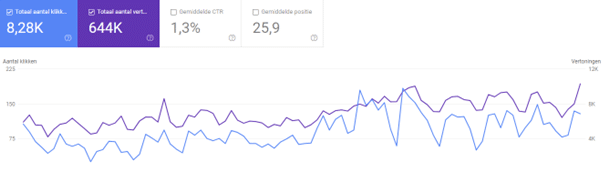
Nobody helps you better than Uncle Google. Not just for videos of cats playing the piano, but also for your search engine optimization, you’ve come to the right place. Google Search Console (GSC) provides you with data directly from the source. So register your website with Google Search Console and reap the benefits for the rest of your online life.
GSC is the perfect place to monitor technical errors and your indexing. Get the most out of it with our Google Search Console guide.
To do
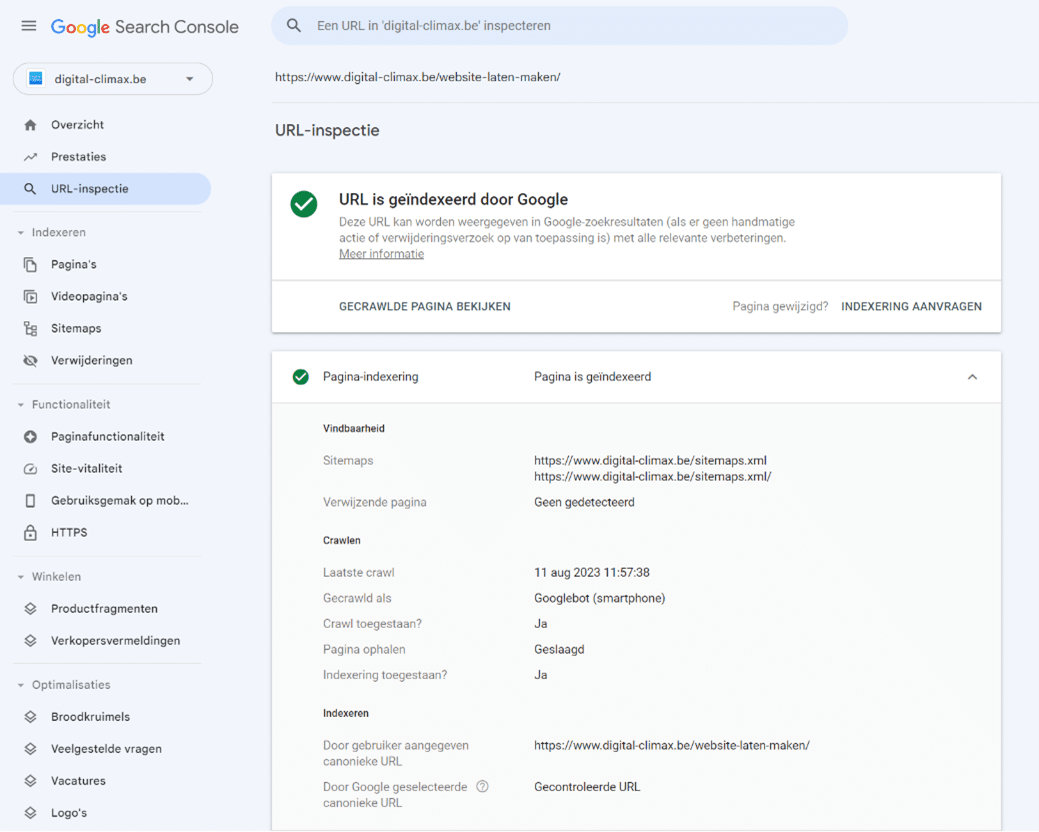
Curious about how Google sees your web pages? In Google Search Console, click ‘URL Inspection’ on the left or in the gray search bar at the top and enter your URL. If your page is indexed, you’ll find a lot of useful information here.
2) Screaming Frog
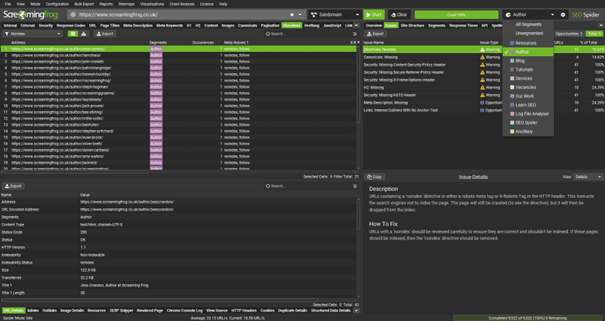
Developed by an English colleague, but we still like to refer to it as a “Swiss Army knife“. The Screaming Frog SEO Spider acts as a crawler and views your website just like Google does. This allows you to track down broken links and duplicate content, analyze meta titles and meta descriptions (together known as metadata), view all tags, and much more. Discover all the possibilities yourself with our handy Screaming Frog manual.
3) Ahrefs
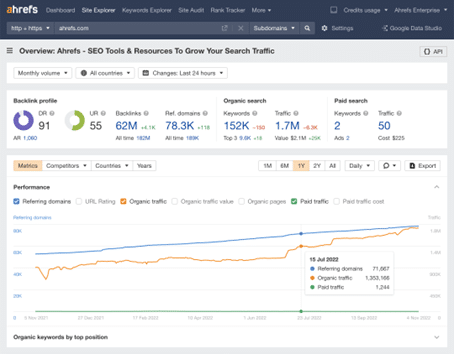
Ahrefs has various functions. For technical SEO, the Site Audit is the most important. It maps out all on-page SEO factors. A handy option is choosing between the mobile or desktop version of your website. With our Ahrefs manual, you’ll be on the right track immediately.
To do
Download the free SEO Toolbar by Ahrefs. This extension gives you immediate insight into the numbers, structure, and technical quality of the page you’re visiting.
How does your page end up on the search engine results page (better known among technical SEO experts as the SERP)? To do that, Google goes through the same process of crawling, indexing, and ranking millions of times every day.
- Crawling: Google sends crawlers, a type of robot also called spiders, through your website to map it out.
- Indexing: the data from the crawlers is stored in the index.
- Ranking: based on ranking factors, Google ranks the indexed pages differently for various search queries.

The number of pages on your website that are mapped out is called the crawl budget. You can use this more efficiently by making your website more accessible to spiders and by regularly posting new content. This way, you build authority: you show your expertise on the subject. And Google loves that, because experts provide the best answers to searchers’ questions.
To do
You can monitor crawl activities in Google Search Console. Click ‘Settings’ at the bottom left and then click ‘Open Report’ under ‘Crawling’. There you can see how often Google has crawled your website and what the average response time was.
To do
Give Google a helping hand by signaling which new pages can be indexed yourself. To do this, click ‘URL Inspection’ on the left in Google Search Console or in the gray search bar at the top and enter your URL.
A sitemap is a file in XML format that contains the entire structure of your website. Think of it as a handy tool for search engines to know which pages they can crawl. For you, it’s more efficient than having to enter the URL of every new page manually.
Side note: adding a sitemap is no guarantee that your pages will be crawled. In practice, however, we notice that it helps you take a significant step forward.
To do
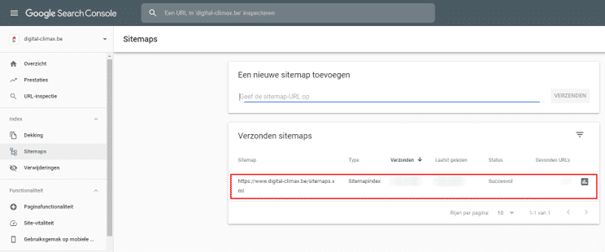
Create a sitemap automatically, manually, or with a plugin, add it to your website, and register it with Google in these three steps:
- Open Google Search Console and click ‘Sitemaps’ under ‘Indexing’ on the left.
- Enter the URL of your sitemap. If you’ve added it correctly, it’s simply ‘www.domainname.extension/sitemap.xml’.
- Wait until the status changes to successful; check again later if necessary.
Crawlers use your sitemap as a map to view your website. So you don’t want any broken links in it. You can easily check this with the iPull Rank Map Broker.
Problems creating or registering your sitemap? Check out our guide on adding a sitemap.
A robots.txt is a small text file that indicates which crawlers have access to which pages of your website. Moreover, you avoid unimportant pages being crawled.
To do
Create a robots.txt and add it to your website in the same place as your sitemap. You can also quickly find out if you have a robots.txt file and what it looks like at ‘www.yourdomainname.yourextension/robots.txt’.
A robots.txt offers possibilities but also has limitations. Not sure what should go in your robots file? Discover how creating a robots.txt works.
Your domain name affects not only your SEO but also your image as a business. So think about it carefully beforehand. Know where you are now, where you want to go, and how you want to get there.
Subdomains also influence your rankings. Google considers them as separate websites, each building their authority on their own. That’s why we choose www.digital-climax.be/portfolio and not portfolio.digital-climax.be.
Tip
You can find many more insights in our domains guide.
Website architecture or website structure is the way your web pages are connected to each other. Your homepage is at the top, with various branches below it. The goal is for your architecture to be as flat as possible. Ideally, every page on your website should be reachable within a few clicks from your homepage.
If technical SEO is the foundation for SEO, then website architecture is the foundation for technical SEO. Don’t underestimate its importance. A clear structure immediately gives you ideas for content and internal links. Those connections between your web pages are essential for building authority, the third pillar of SEO.
Tip
Read our guide for an SEO friendly website architecture.
So, before you build your website, take a blank Word document or a sheet of paper and put ‘HOME’ at the top. From there, branches lead to your most important pages, which in turn link to subpages. Do this and you’ll avoid a lot of headaches and problems in the future.
To-dos
- Search engines love internal links. Add them in both directions and watch your pages rise in the search results.
- Your website architecture forms the basis for mapping out your breadcrumbs. These ‘automatically’ lead your visitors and search engines around your website.
- Use Google Search Console or Screaming Frog to track down orphan pages. These orphan pages without incoming links are begging for internal connections.
Do you surf (like more than 3 billion other users) with Google Chrome? Then there’s a padlock to the left of our URL at the top. This SEO agency has a secure website with an SSL certificate (Secure Sockets Layer) and therefore an https connection.
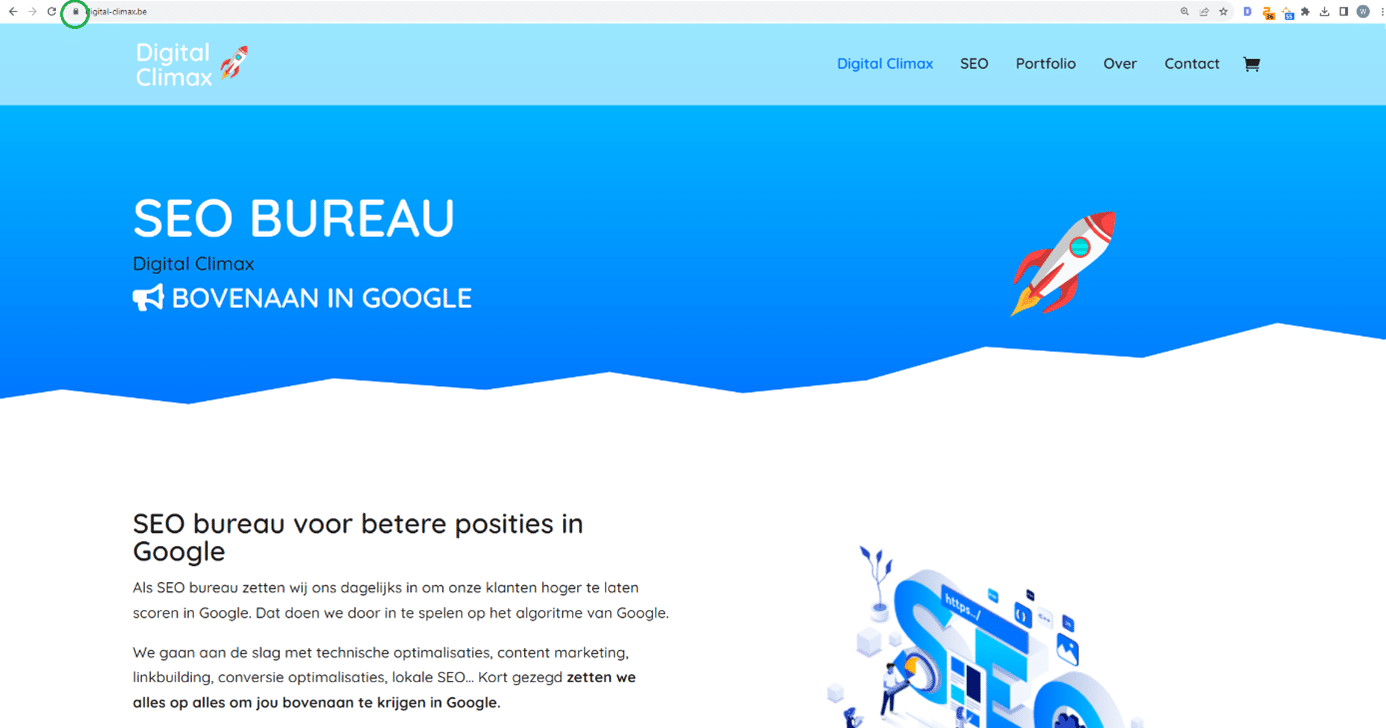
This means you can leave sensitive information here with peace of mind. For search engines, this radiates trust, an important part of the third SEO pillar, authority. Security has been a ranking factor since 2014. Moreover, you’d rather not have Google scare off potential visitors by warning them about your insecure website.
To do
If you still have an http:// website instead of https://, with the S for secure, be sure to contact your hosting provider. They usually offer https as standard in their packages. Sometimes technical SEO doesn’t have to be complicated 😁 Just remember to set up redirects from your old domain to your new one. That way, you won’t lose any organic visitors.
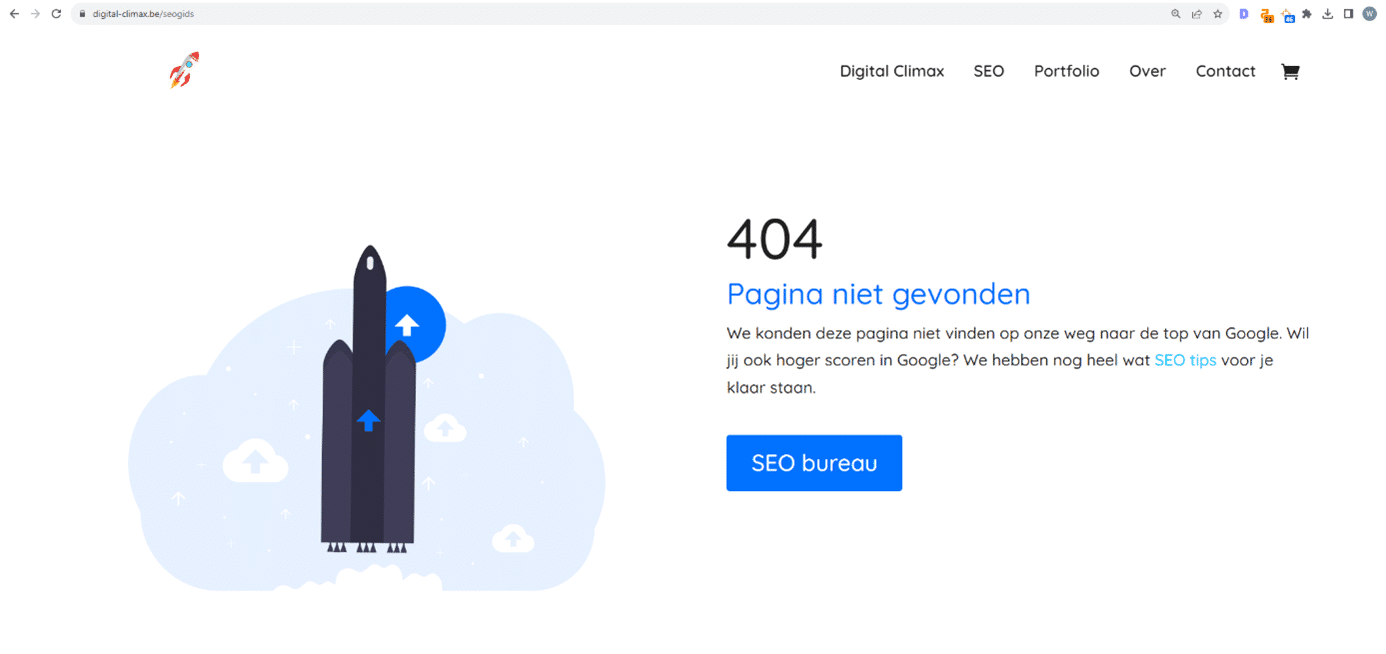
It seems obvious, but we see it go wrong every week. So make sure that all links on every page of your website work. Nothing is more annoying for a user than clicking and getting nowhere. It’s logical that Google punishes you for it. A 404 status code is literally and figuratively a red flag. You only want to see green 200 status codes.
Equally bad, but less visible than 404s, are redirects. Your user clicks on URL 1 and only reaches URL 4 via URL 2 and 3, the page you (indirectly) think belongs to URL 1. Such redirect chains have a negative impact on your SEO. They waste your crawl budget, reduce your authority, and slow down the loading speed of your pages. You’d be surprised how often redirect chains occur, but they are hard to detect without tools.
To do
Of course, nobody intentionally puts broken links or redirect chains in their website. They sneak in over the years unseen. Therefore, use Google Search Console or Screaming Frog, tools that clearly show you which HTTP status codes belong to which web page. This way, you can track down 3xx and 404 status codes and then repair them.
Duplicate content is content that is (almost) the same on different web pages. For search engines, that’s pure horror. They have no idea which is the most relevant page for a particular search query. It’s also unclear to users which page they should land on and which URL they should use for backlinks.
Pages with duplicate content never appear high in the SERP. Not because Google punishes you, but because you are competing with your own pages.
Duplicate content isn’t just illegally copied text from other websites. It also happens unconsciously when you have two versions of your website, for example, www/non-www and http/https. In webshops, similar content often occurs on pages with categories and products.
To do
In our article about duplicate content, you’ll learn how to detect duplicate content. You can use Google Search Console or an online tool for this. Then you have several options to solve the problem:
- With a 301 redirect, you point to the correct URL. Be sparing with them to avoid redirect chains.
- With a noindex tag, you prevent crawlers from indexing the duplicated pages.
- With a canonical tag, you indicate which pages are important and which are not.
Noindex tags
| <meta name=”robots” content=”noindex”> |
Is there a noindex tag in the <head> section of your page? Then search engines know that that part of your website should not be indexed. Such a tag is useful, for example, for a landing page only intended for people who sign up for your newsletter. And you avoid duplicate content by placing a noindex tag on pages with duplicate content.
Nofollow tags
<a href=”https://www.example.be/product” rel=”nofollow”>product name</a> |
A nofollow tag tells crawl bots that they should not follow one or more links. Well-known websites where users add content themselves, such as Wikipedia, YouTube, and Reddit, use the nofollow tag by default on all their outgoing links. This ensures their authority isn’t hijacked by others. According to Google’s guidelines, paid links are also required to have a nofollow tag.
Canonical tags
<link rel=”canonical” href=”https://www.example.be”> |
It’s best to avoid duplicate content. Yet, it’s not always possible. For example, you have two exactly identical versions of your website, one with www and one without. Or in your webshop, there are different product categories that overlap. Then it’s important to make it clear to search engines which page is the original or the most important, so that it gets indexed.
That’s where a canonical tag comes in handy. You add them manually or with a plugin to the <head> section of your HTML. For example, the canonical tag above on page Y indicates to Google that “www.example.be” should be indexed instead of page Y. Canonical tags make life easier for search engines and are therefore good for your SEO.
Tip
With all kinds of tags, a robots.txt, and redirects, it’s sometimes hard to determine how Google indexes your page. To do this, click ‘URL Inspection’ on the left in Google Search Console or in the gray search bar at the top and enter your URL. Open ‘Page indexing’; under ‘Indexing’, you’ll see which URL you’ve indicated as the most important and which one Google uses.
FAQs, a recipe, a book… No two online pages are the same (and if they are, they both rank terribly). Yet many pages are cast in the same structure. If you clarify their markup schema to search engines, you make it a bit easier for them to crawl, index, and rank you.
You summarize the properties of the different structures in structured data. This universal code is attached to your page and immediately makes it clear to crawlers which category your page falls into. This increases the chance of ending up in SERP features or ‘rich results’. Think, for example, of a short text snippet at the top that is a direct answer to the search query (the coveted Featured Snippet) or other questions people also ask (also known as People Also Asked). Or a video illustrating the search query and thus becoming part of your video SEO.
To do
Unlike an alt description, you don’t just whip up structured data. Uniformity is important; usually, JSON-LD is used. With our Structured Data Generator, you can easily get started yourself to create custom structured data for your pages.
There are several ways to implement structured data: manually in the <head> tag, via Google Tag Manager, or with an SEO plugin. Afterwards, check if everything went as planned with the Google Rich Results Test.
The days when we only explored the World Wide Web with our desktops are long gone. From widescreen monitors to laptops, tablets, and smartphones: your visitors view your website on different formats. And there’s nothing more annoying than having to scroll or zoom in and out to see and read everything.
That’s why search engines place so much importance on a responsive website. Google has been focusing on mobile-first indexing since 2016. Therefore, set your HTML and CSS correctly. This way, your website content automatically adapts to your visitor’s device.
To do
Add <meta name=”viewport” content=”width=device-width, initial-scale=1.0″> to your web pages. This indicates that your content covers the full width of your visitor’s device and starts from the default zoom level.
To do
Discover how responsive your website is via the free Google Mobile Friendly tool or in Google Search Console. There, click ‘Mobile Usability’ under ‘Experience’ on the left. Green pages are good; for red pages, Google suggests improvements such as larger text.
Those who have time to read pick up a book or the newspaper. Online, we’re used to clicking through. We scan instead of reading. Our eyes are constantly looking for anchor points. Use them to lead your visitors through your content.
In combination with white space, headings and subheadings bring that much-needed structure and calm to your content. Great for your visitor and an important technical SEO factor. As always with SEO: use them logically and consistently and you’ll be rewarded.
- <h1>: the main title of your page, definitely including your keyword, maximum 1 per page
- <h2>: standard subheadings to separate text blocks, regularly including your keyword
- <h3>: to further separate your text blocks if necessary
- <h4>: we use these very rarely (and <h5> and <h6> never)
You have to be very interested in the subject to stick around on a website with only text. If you want to have a webshop built, images are more likely than text to convince your visitors to make a purchase. And although an SEO copywriter might cringe at the words, it’s true that a picture sometimes says more than a thousand words.
So optimizing your images for search engines is an important part of your technical SEO. Think especially about the perfect file size, the right file name, and a complete description. Search engines don’t see what’s in your photo. And the internet is simply too big to analyze every photo repeatedly down to the smallest detail.
To do
Open your CMS media library and go through all images. Pay attention to these properties and correct them if necessary:
- File name: avoid IMG_20231007_140537; rather incorporate your keyword into the file name.
- Alt description: again with your keyword and more info about what the image shows.
- File size: 1 MB is the absolute maximum, 500 kb is better. Use a free online tool like NET to compress images.
Tip
We’ve bundled all our knowledge about image SEO into a handy guide.
Why are lighter images so important? Because 1 in 5 online shoppers abandon their digital shopping cart because the payment process takes too long. And because 53% of mobile visitors leave a page that takes more than 3 seconds to load. Yet more than half of all websites don’t take this into account. Read all about the connection between website speed and SEO.
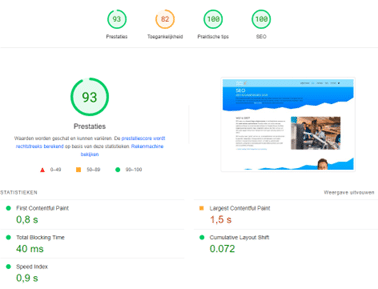
A slow website means fewer visitors, fewer leads, and less revenue. And when users drop off, search engines drop off. Fortunately, Google doesn’t leave you completely in the lurch. It revealed that these three statistics, together known as the Core Web Vitals, count directly toward your ranking:
- Largest Contentful Paint (LCP) or loading time: less than 2.5 seconds is good, more than 4 seconds is bad
- First Input Delay (FID) or interactivity: less than 100 milliseconds is good, more than 300 milliseconds is bad
- Cumulative Layout Shift (CLS) or visual stability: less than 0.1 is good, more than 0.25 is bad
To do
You can discover how (fast) your website is doing via the free tool Google PageSpeed Insights. Enter your URL and Google reveals the scores for your performance, accessibility, and SEO. The closer you are to 100, the better. Moreover, you get practical recommendations to improve your scores.
Conquered Flanders and ready to cross the language border? Or are you confident enough to expand your target audience with the residents of our neighboring countries? Then a website in the corresponding language is essential.
The biggest challenge is undoubtedly the content. It must be tailored to a new target audience, with new preferences, new information, new conditions… But translating a website also means you have to consider a number of technical questions:
- Domain name: will you go for ‘www.biervanhier.be/fr’, for ‘www.biervanhier.fr’, or even for ‘www.bieredici.fr’?
- Content optimization: is a translation of your keywords enough, or does your new target audience interact with Google very differently than your existing one?
- Search engines: is your robots.txt correctly set up for local search engines, such as Baidu in China or Yandex in Russia?
We sincerely apologize for using ugly words in this technical SEO manual… But anyone who loves SEO (like you and us) gets shivers at the sound of Javascript – and especially at the sight of it.
Although search engines like Google understand Javascript better today, the relationship status is still ‘it’s complicated’. You build your web page in HTML and CSS. Javascript provides extra dynamics by making changes afterwards. But Google doesn’t see those changes immediately. Search engines then execute the entire code to guess what the final result is.
You understand correctly: Google is still not a fan of Javascript. If you want to rank high in the SERP, this is not your primary programming language. Double-check this with your web developer, especially if you’re having a new website built.
Does technical SEO make a difference? Absolutely. Just look at these examples from two of our clients.
Website architecture
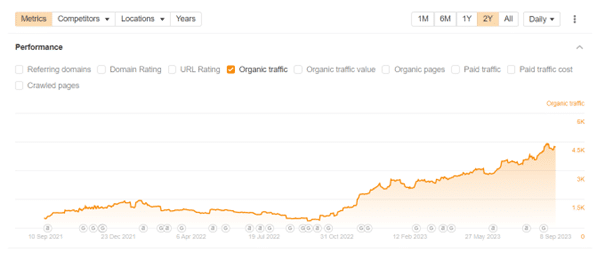
Shopify is a popular option when you have a webshop built. It’s an accessible platform. A major disadvantage, however, is that Shopify doesn’t allow for a hierarchy in URLs. This makes it much harder to design an SEO-friendly website architecture. This way, you miss many opportunities to create logical internal links.
For this client, we started from content clusters. These form the foundation for the content for the category pages. In them, we write about the category, but we also place internal links to subcategories. This way, Google understands how your website structure fits together, even if the website architecture isn’t clear. Result: 10 times more visitors in 1 year.
Tip
Besides your website architecture, your Shopify webshop can be further optimized for search engines. Discover many more tips and tricks in our Shopify SEO guide.
Indexing
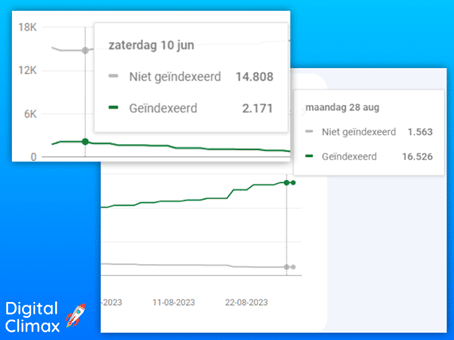
This client had nearly 17,000 pages online in his webshop when he approached us. Of those, only just over 2,000 were indexed. In a few months, we boosted that number to over 16,500. That means more than 8 times more chances to end up in the SERP and more than 8 times more chances for clicks. Now that the foundation is laid, we’re looking at the next steps to get those 16,500 pages even higher in the search results.
The result:
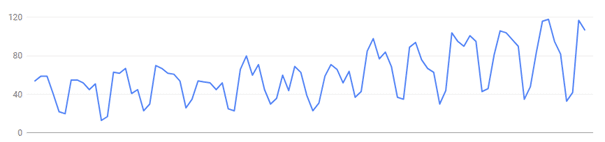
More traffic to your website, makes sense, right?
I started building websites as a student entrepreneur 5 years ago myself. HTML, status codes, and sitemaps still have a special place in my heart. But in the meantime, SEO has completely captivated me. Digital Climax’s focus is 100% on search engine optimization.
So with technical SEO, I combine two great passions. As a technical SEO specialist, I ensure that everything behind the scenes is finely tuned and keeps running smoothly. This ensures your website is logically structured, making it more user-friendly for both your visitors and search engines.
At Digital Climax, besides technical SEO, we also focus on content and authority, with experts for every domain. By taking care of all aspects of those three important SEO pillars, your website will rise visibly in the search results. And that brings you more visitors, more leads, and more revenue.
We’ve listed all technical points in a handy overview. This way, you can check off what you’ve improved.
Table of contents: Technical SEO guide
- Rank in Google thanks to your technical SEO
- What is technical SEO?
- The importance of technical SEO
- How it works
- What skills do you need for technical SEO?
- Indispensable tools
- Crawling, indexing, ranking
- Sitemap
- Robots.txt
- Domains and subdomains
- Website architecture
- Https
- 404s and redirects
- Duplicate content
- Tags
- Structured data
- Responsive website
- Heading levels
- Images
- Website speed
- Translations
- What about JavaScript?
- Case study