SEO tools: which ones exist and what are they for?
What is an SEO tool?
SEO tools help you optimize your SEO. A tool like that gives you insight into your own SEO score and your competitors', for example, helps with your keyword research, or gives you advice and points to improve. Below, you'll get to know these SEO tools:
Our own SEO tools
At Digital Climax, we build SEO tools with features we couldn't find anywhere else. That's how we ended up developing a Strategy Builder, a Chrome extension and WooCommerce plug-ins.

SEO Chrome Extension
Download our own Chrome browser extension. Handy for quickly analyzing web pages and flagging issues.

DC Architect
With the Digital Climax Architect tool, you build wireframes, create sitemaps and spot opportunities with AI keyword mapping.

Log file Analyzer
Download this dashboard to accurately measure your website traffic (direct, organic, AI, …) from server logs in just a few steps.

Structured Data Generator
Structured data helps search engines understand what content your pages offer. Easily generate structured data yourself with our free tool.

SERP Simulator
Find out in a few clicks whether your page title and meta description are the right length, and how Google shows your page in the search results.

WooCommerce SEO plug-in
We built 2 plug-ins for WooCommerce:

HTML Table Generator
Easily create the HTML code for tables on your website.
Let's start with the all-in-one SEO tools. These are SEO tools you can use for different purposes. They offer several services, such as a keyword tool, website analysis, backlink analysis and often a lot more.
Ahrefs
Ahrefs is one of the most comprehensive SEO tools around. Its main features:
- Site Explorer: check the backlink profile of a website and run competitor research.
- Keywords Explorer: the tool for your keyword research.
- Site Audit: an analysis tool that maps out your on-page SEO performance.
- Rank Tracker: keeps an eye on your position in the search results.
- Content Explorer: analyze all the content in your industry.
Curious how to use this SEO tool? Then be sure to read our Ahrefs guide.


SEMrush
Together with Ahrefs, SEMrush is one of the most versatile SEO tools out there. A true all-in-one SEO tool, in other words. What can SEMrush do for you?
- Keyword Research Tool Kit: gives insight into the use of and competition for keywords, shows relevant and similar keywords, indicates keyword difficulty and a lot more.
- Run a website analysis and list points to improve.
- Gives insight into backlinks and advice on earning more backlinks.
- Competitor analysis in Google Ads and Google Shopping.
SE Ranking
SE Ranking is an SEO tool that focuses mainly on keywords, but you can do a whole lot more with it.
- Keyword suggestion tool
- Keyword grouping: an advanced tool that lets you group your keywords quickly and precisely.
- Marketing Plan: valuable SEO tips based on the analysis of your website.
- Website audit: a complete SEO checkup of your website.
- On-page SEO check
- Keyword rank tracking: the competitor analysis tool.
- Backlink monitoring: tracking software that keeps a constant eye on your backlinks.
As you can see, this is a very versatile tool that uncovers a lot of valuable information.
Besides the handy all-in-one SEO tools, there are also plenty of tools that focus mostly or entirely on keywords. They give you keyword ideas and/or insight into the keywords you and your competitors use.

Answer The Public
One of the best-known SEO tools to start or expand your keyword research is without a doubt AnswerThePublic. How can AnswerThePublic help you?
- Shows you relevant keywords for a topic
- Gives you inspiration and ideas for new content
- Ideal for finding long-tail keywords
- Automatically completes your keyword with questions: what, how, why, when…
To work efficiently with this keyword SEO tool, we recommend going through our AnswerThePublic guide.
Ubersuggest
Another SEO tool for keywords is Ubersuggest. It also helps you start or expand your keyword research. Ubersuggest gives you the following information about a keyword:
- The search volume
- The cost per click (CPC)
- The paid difficulty
- The SEO difficulty
- An overview of the competition for the keyword and how hard it is to rank for it
With our Ubersuggest guide, you'll be up and running with this handy SEO tool in no time.

To get more insight into the SEO score of your website (or your competitors'), there are handy SEO tools that analyze your website. They scan it against a whole set of predefined criteria and then give you a score, for example, or point out issues and areas to improve.
Detailed SEO Browser Extension
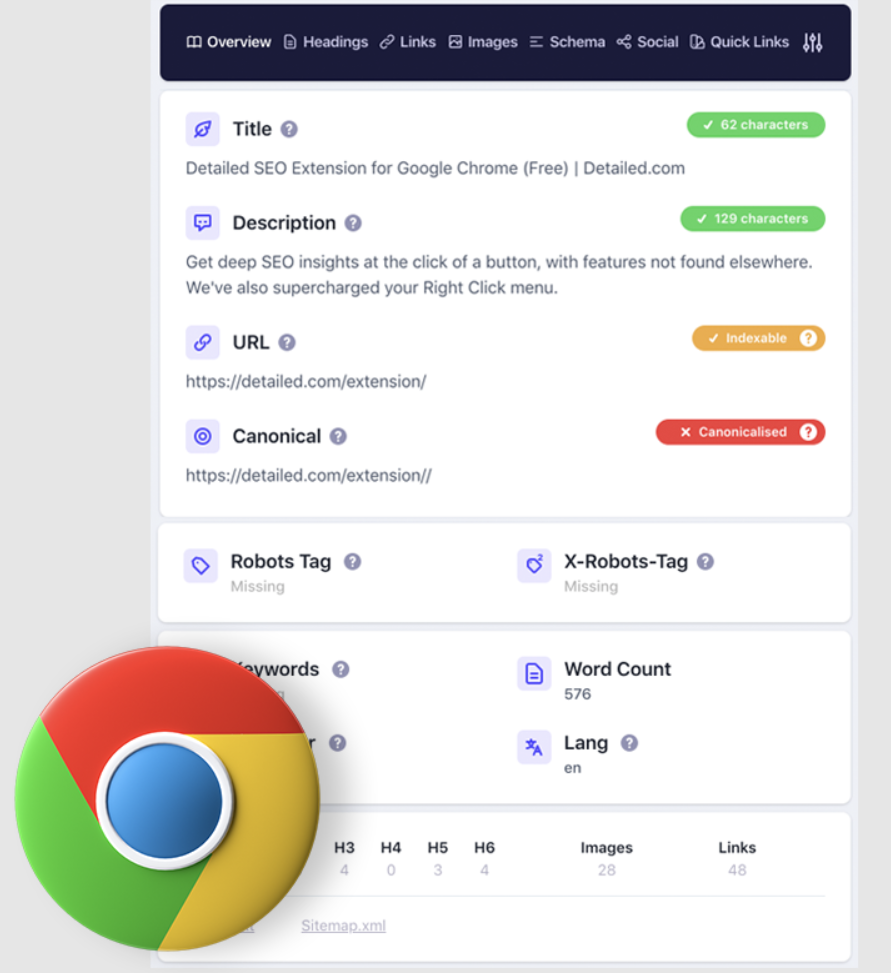
First in the line-up of SEO analysis tools is a browser extension. With the Detailed SEO Browser Extension, you can easily view all the SEO information of a page.
- The title, meta description and URL of the web page
- If applicable: the canonical tag, robots tag and x-robots tag
- The length of the text, the language, the author and possibly the keyword
- The heading structure of the page
- An overview of all incoming and outgoing links
- An overview of the number of images and how many of them have an alt tag and title
- The schema the page uses
- Information about the website's social media
The Detailed SEO Browser Extension also lets you highlight nofollow links and track down duplicate content. Our Detailed SEO Browser Extension guide explains everything you need to get started with this handy tool yourself.
PageSpeed Insights
PageSpeed Insights is an SEO tool from Google itself. It gives you insight into the loading speed of your website. PageSpeed gives you the following information:
- Whether your website loads fast, average or slow
- How well your website scores on the Core Web Vitals
- Recommendations to help your website load faster
- Insights for both desktop and mobile
Because Google attaches more and more importance to fast loading times, PageSpeed Insights is a useful tool to optimize your website.
Screaming Frog
Screaming Frog is an SEO spider or crawler that helps you optimize your on-page SEO. A real must for optimizing your website for SEO, at least if you have the time to get the hang of it. Because Screaming Frog gives you a huge range of options:
- Find broken links
- Analyze meta titles and meta descriptions
- Find duplicate content
- Generate XML sitemaps
- Extract data from a website's HTML
- Crawl JavaScript websites
- Schedule crawls
- View robots.txt and tags
- Connect to Google Analytics, Search Console and PageSpeed Insights
- Visualize your website architecture
- Compare crawls
Learn to use this Swiss Army knife for your SEO with our Screaming Frog guide.
Modest as we are, we're happy to put our own Structured Data Generator right next to Google Search Console, without a doubt one of Google's best-known tools.
Google Search Console
The best insights come straight from the source. Google Search Console gives you information and insights from the search engine itself. A nice bonus if you want to optimize your website so it's easier to find online. What are the main features of Search Console?
- Getting a page indexed quickly
- Doing keyword research
- Checking your Schema.org markup
- Removing content from Google
To help you get started with Google Search Console, we wrote a handy Google Search Console guide. It clearly explains how to use this SEO tool and why it matters so much.
Datapps SEO Management Software
A complete application for managing SEO projects. Think of features like project management, time tracking, backlink overviews and linking keywords to your projects. On top of that, Datapps fully tailors the application to your business, so you carry out all your SEO tasks efficiently and get everything you need to grow.
Structured Data Generator
We're proud to present our very own Structured Data Generator. This SEO tool lets you easily add structured data to your website yourself. That helps Google better understand what's on your website.
SERP Simulator
Last but not least, there's our own SERP simulator. This tool lets you enter meta data such as the title, description and more. It shows in real time how they look on Google, so you avoid meta data that's too long or too short.