SEO migration
With an SEO migration, you move the SEO value of your old website to your new website. This way, you maintain your search engine rankings and lose a minimum of organic traffic.
Are you doing a website migration? Then definitely don’t forget your SEO migration. We’ll explain how to do it here step by step.
But watch out! Because an SEO migration isn’t just about redirecting your URLs, but also structural changes to your website. Even then, you need to do an SEO migration.
Free checklist & step-by-step plan
Your old website has built up SEO value. With an SEO migration, you move that value to your new website. This reduces the chance of losing organic traffic.
Do you want to keep your positions in Google? Then you need to do (or have someone do) an SEO migration. If you don’t, there’s a good chance you’ll have to start from scratch with SEO.
The following example shows the importance of a good SEO migration:

When this client came to us, their new webshop was already in development with their web developer. We were to help them further with their SEO migration and growth. No sooner said than done. We guided them through the process and performed an SEO migration to transfer the SEO value of their old webshop to the new one.
But what happened? The checkout system of their new webshop wasn’t performing well enough. Because there were no options to adjust this, we decided to switch to another platform.
After their new webshop was set up on the suitable platform, we performed the SEO migration again. With the right support, this client is now on their way to getting the most out of their webshop.
This situation proves that every case is unique. That’s why you often hear “It depends” in SEO land. Exactly what needs to happen to maintain your SEO value and get everything out of your website or webshop depends entirely on your current situation.
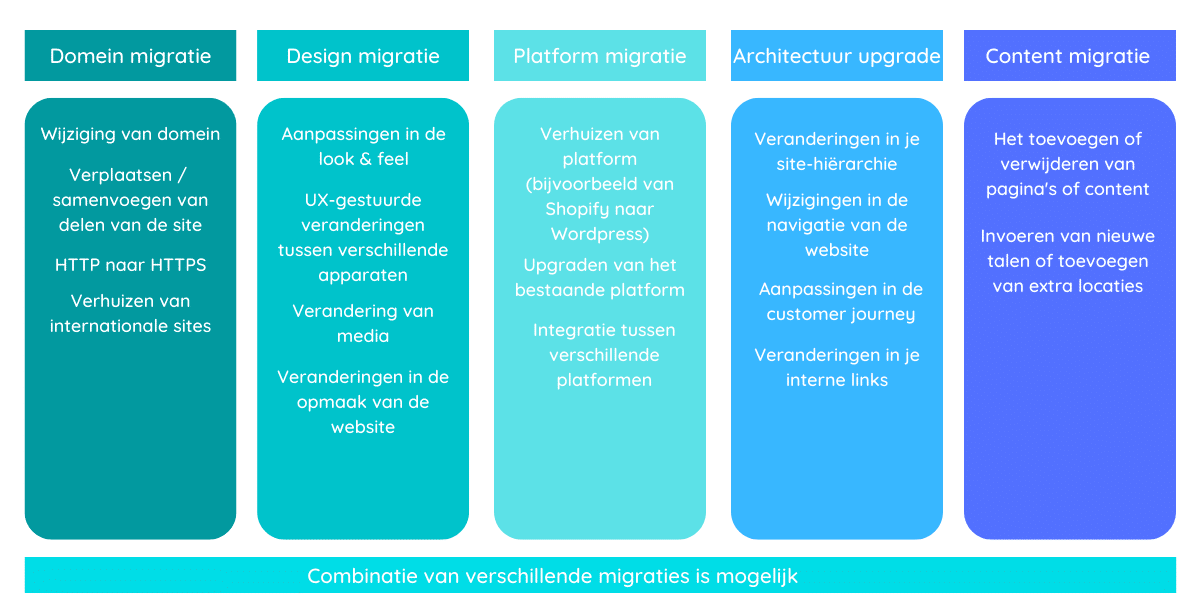
Every SEO migration is different. The approach has everything to do with the type of migration that needs to happen.
- Domain migration: needs to happen if you move the location (URL) of your website. For example, because you change your domain name or switch from HTTP to HTTPS. This second case is less common today, as HTTPS has become the standard.
- Design migration: needs to happen if you’re going to redesign your current website. This also includes your media files and the code. Structurally, almost nothing changes on the site; you’re mainly focusing on a new design.
- Platform migration: needs to happen if your website moves from one system to another. For example, a move from Shopify to WordPress.
- Architecture migration: needs to happen if you make changes that affect the navigation and structure of your website.
- Content migration: is performed to move and adapt your existing content.
1) Get an overview
Map out all your pages (URLs). Both the old URLs and the new URLs. This allows you to create a list of redirects. We call this redirect mapping. This way, you know exactly which 301 redirects you need to set up.
2) Set up your tracking
Before you start an SEO migration, make sure you can track everything. Google Search Console is your Swiss army knife for bringing an SEO migration to a successful conclusion.
3) Migrate your content
All relevant content needs to be transferred. A lot of work goes into this. So don’t underestimate this step. Even with tools and export/import files, you can expect some obstacles.
Tip
Focus only on relevant content. For example, we once deleted all blogs from a site. They didn’t target any keywords, attracted irrelevant visitors, and cost a lot of money to maintain. There was no cost-benefit logic in the articles.
From there, we started with high-quality articles that appeal to the right visitor. You effectively notice a difference in results there. Traffic? That’s a bit lower at first, but the number of leads? That stayed the same (with or without the blog).
4) Create an XML sitemap
Hopefully, your old website was equipped with an XML sitemap. For a new website, ensure a new sitemap with up-to-date URLs.
Tip
Many systems can automatically provide a sitemap. This way, you don’t have to create a new sitemap for every page added or removed.
Every SEO migration is different
Before you start your SEO migration, set up your strategy. Determine in advance what needs to happen before, during, and after your SEO migration.
By now, we’ve gone through quite a few SEO migrations. You often see certain patterns recurring. So prepare yourself for the following scenarios:
Drop in traffic
Right after your SEO migration, your organic traffic may drop. Search engines need to get to work to map out your changes. Thanks to a good SEO migration, this goes a lot smoother. Still, they might glitch for a bit because a lot is changing.
Is your SEO migration set up well? Then your traffic will return quickly.
Panic
Nobody likes to see those drops happen. Yet they are part of it. Don’t intervene too quickly. Have confidence in your migration strategy and don’t deviate from your plan. By quickly changing things and starting to test, you’ll confuse search engines even more. Not recommended.
Backup
A mistake can sometimes slip in when publishing a new website. Make sure your team is ready and provide extra SEO support on the day of your migration.
This way, you have backup ready to intervene if things go wrong.
Growth
Yes, an SEO migration requires a lot of work and involves some risks. Yet it’s often worth it. A new, better website helps you achieve better results. Both in terms of SEO and conversion-oriented.
A successful SEO migration goes through several crucial steps.
1. Determine your strategy
Every website migration is different (think back to our case at the top). That’s why it’s best to ensure a tailored approach in collaboration with an SEO specialist.
Don’t deviate from your strategy too quickly. Panic reactions get you nowhere. A well-thought-out and proven strategy is of great importance.
2. Create a redirect mapping
Map out all your current URLs in a clear file (our go-to tool for this is Excel). In this document, you also collect all your new URLs and set up a redirect map.
3. Perform a technical audit
Check if your new website meets the technical standards of a good website. Adjust and adapt where necessary.
You can find a handy overview of all important technical aspects in our SEO manual.
4. Reserve time during and after the migration
Small mistakes can sometimes slip through the cracks. So reserve time during and after your integration to intervene quickly.
The faster you solve those errors, the better.
Tip
Prevent errors with your redirect mapping. Do this in advance. So take some extra time to double-check this.
5. Don’t underestimate it
An SEO migration is anything but child’s play. Start on time and provide enough slack for testing.
1. Crawling
After your new website goes online, the search engine has to get to work. They crawl your new website and map everything out.
Crawling doesn’t immediately mean those changes are also shown. For that, indexing is important.
2. Indexing
We view crawling and indexing as 2 separate steps. The fact that your page was crawled doesn’t mean it was also indexed.
When a page is indexed, it means it can be shown when your ideal customer searches for something. Crucial for achieving results with SEO.
Tip
You can track the status of every URL in Google Search Console.
3. Ranking
Now that your new website is indexed, you’ll notice a difference in the search results. We are obviously aiming for higher positions. But expect less traffic initially.
Follow up on your migration and adjust where necessary. Don’t forget to have a little patience.
Migration steps before launch
1. Baseline measurement
Map out your current situation. You do this before you start the SEO migration. This way, you have a benchmark to compare with afterwards.
2. Map out your architecture
If you have to get to work with an SEO migration anyway, you might as well be thorough. Map out what you want to say and ensure a logical structure in your website.
Many people skip this step and just start coding. You take a clear website architecture with you throughout your entire SEO process. This way, you maintain an overview of what is where and how everything is connected.
3. Create a redirect map
Now that you know how your new site is built, you can connect the dots. In a redirect map, you ensure that the old URLs are forwarded to the new URLs. This way, your user and Google don’t fall into a black hole.
Tip
Avoid an internal redirect. So check and double-check all your internal links.
4. Technical audit
It’s best to do your technical audit well in advance. This way, your web developer can still adjust where necessary. That brings 2 advantages:
- You start with a solid website
- The errors are often still solved within the price since you’re still building and errors are detected. Do you do this after the launch? Then web developers often charge extra costs.
Migration steps during launch
1. Technical audit
You see that right, another technical audit. Fortunately, this one usually goes a lot smoother. Check if all your points for improvement have come through well. When going live, something can sometimes fall away or go wrong. New problems can also crop up.
A new audit is therefore crucial to be sure you start smoothly. No errors to be found? All the better! Better safe than sorry.
2. Update Google Search Console
Inform Google that changes have happened on your website. Submit your new sitemap. For your most important pages, you can manually request indexing. However, that’s not a requirement.
Migration steps after launch
1. Follow up on Google Search Console
Now Search Console really comes in handy. You can perfectly track which pages have been updated, which were indexed, and where Google still finds errors.
Follow this up weekly after your SEO migration. This way, you can quickly detect and solve errors.
2. SEO loop
Start with the SEO loop. Our name for the continuous improvement of your website. Work on the 3 pillars of SEO: Technical, content, and authority.
Read more about how to use SEO in practice:
Tip
Keep track of what you change and when. This way, you can track and explain increases or decreases in the future. That’s how you learn and know what works and, more importantly, what doesn’t work.
The biggest danger of an SEO migration is not doing one. That has catastrophic consequences for your organic traffic.
Do you have little or no organic traffic on your website yet? Then the risks are smaller. Investing in an SEO migration doesn’t always pay off. Discuss your situation with an SEO expert.
To successfully perform an SEO migration, you need several tools:
- Screaming Frog
- Google Search Console
- Ahrefs, or another keyword and audit tool
Old site offline, new site online
90% of SMEs put their new site online without doing an SEO migration, setting up redirects, or thinking about the new architecture. A shame, because that’s how you lose SEO value that your old website has built up.
Not setting up a strategy
Some do mention certain things like a redirect map, but forget to look at the overall picture. As a result, nothing is done about the architecture and navigation. If you’re doing a migration anyway, you’d better make all the puzzle pieces fit. Work out your SEO strategy immediately and commit to a good SEO mindset.
Letting the staging environment be indexed
During the development of the new website, you must shield the site from search engines. If you don’t? Then your old site can compete with your new site. This causes you to lose traffic and confuse your visitors.
Lazy redirects
By this, we mean that you redirect all non-existent URLs to the homepage. That is not done. You need to set up a redirect map and link all the old URLs to the new ones.
For pages that no longer exist and cannot be correctly redirected, provide a 404 page.
Not redirecting media
In addition to your pages, you also need to redirect your images and videos so that search engines can link them. This step is often forgotten.
Forgetting Google Search Console
Many people don’t know this tool exists. The data in it is invaluable, especially during an SEO migration.
Wanting to redo everything
Do you only want a new layout or new design? Then it’s perfectly possible to keep your existing URLs. This way, you don’t make it harder for yourself than it already is.
Keep your URLs, architecture, and navigation. That makes a redirect mapping, new sitemap, and many other steps unnecessary.
Sometimes it’s a small switch that saves you a lot of costs.
Setting up 302 redirects instead of 301 redirects
A 302 redirect indicates a temporary move. With a website migration, it’s always about a permanent move and you need 301 redirects.
Creating redirect chains
Is it not the first SEO migration you’re doing? Then redirects may already exist.
For example: URL A was once redirected to URL B. URL B now needs to be redirected to URL C.
Don’t forget to update your redirect from A to B to go from A to C. Otherwise, you’re sending Google around unnecessarily. Bye bye crawl budget.
Throwing away your old site immediately
It’s interesting to leave your old website for a while on a subdomain. For example, old.yourdomain.be. This way, you can still go to the old site to look something up.
Don’t forget to exclude your old website from crawling and indexing.
Table of Contents
- What is an SEO migration?
- Why invest in an SEO migration?
- Types of SEO migrations
- How to start an SEO migration?
- SEO migration points of attention
- How does an SEO migration work?
- Google’s steps during an SEO migration
- SEO migration steps
- The risks of an SEO migration
- What do you need for an SEO migration?
- Common SEO migration mistakes