
Visual sitemap builder
Your website mapped out: clear, simple and scalable
A strong and clear sitemap is the basis for a lasting and successful website. With our sitemap generator, part of our own all-in-one Architect tool, you map out all your pages in no time.
- Your full sitemap clear at a glance
- A clear view of categories, subcategories and internal links
- Easy to share with colleagues, external parties or clients
- Real-time updates on the status of tasks
- Practical tool for building an SEO-friendly website
This website wireframe is your guide while building new pages or optimising existing content.
Visually clear for everyone who works on it. No complex architectures, but structure in no time.

Request your demo
Anyone deliberately looking today for a tool that combines SEO keyword mapping with wireframing, is often left wanting. Common challenges? No clear overview of hierarchy, a lack of insights and no user-friendly features.
That is exactly why we do it differently. Our Architect tool helps you plan websites faster and structure them better. You need just one dashboard for well-founded choices in SEO, content and UX.
Request your free demo. Discover how you transform your website architecture from a thought process into a concrete, scalable system that really delivers results.
Curious how your website ranks today? Choose a no-obligation SEO scan and get insight into the SEO health of your existing website.
Our sitemap generator: handy for internal and external use
Starting on a new website as an agency? Or optimising existing pages as a marketer? Then it is best to start from a clear and logical plan, just like when building a house.
Our sitemap generator, a practical visual sitemap builder, is a powerful aid for communicating both internally and externally. This is what marketers, SEO specialists, strategists, stakeholders, developers, clients and colleagues rely on our tool for:
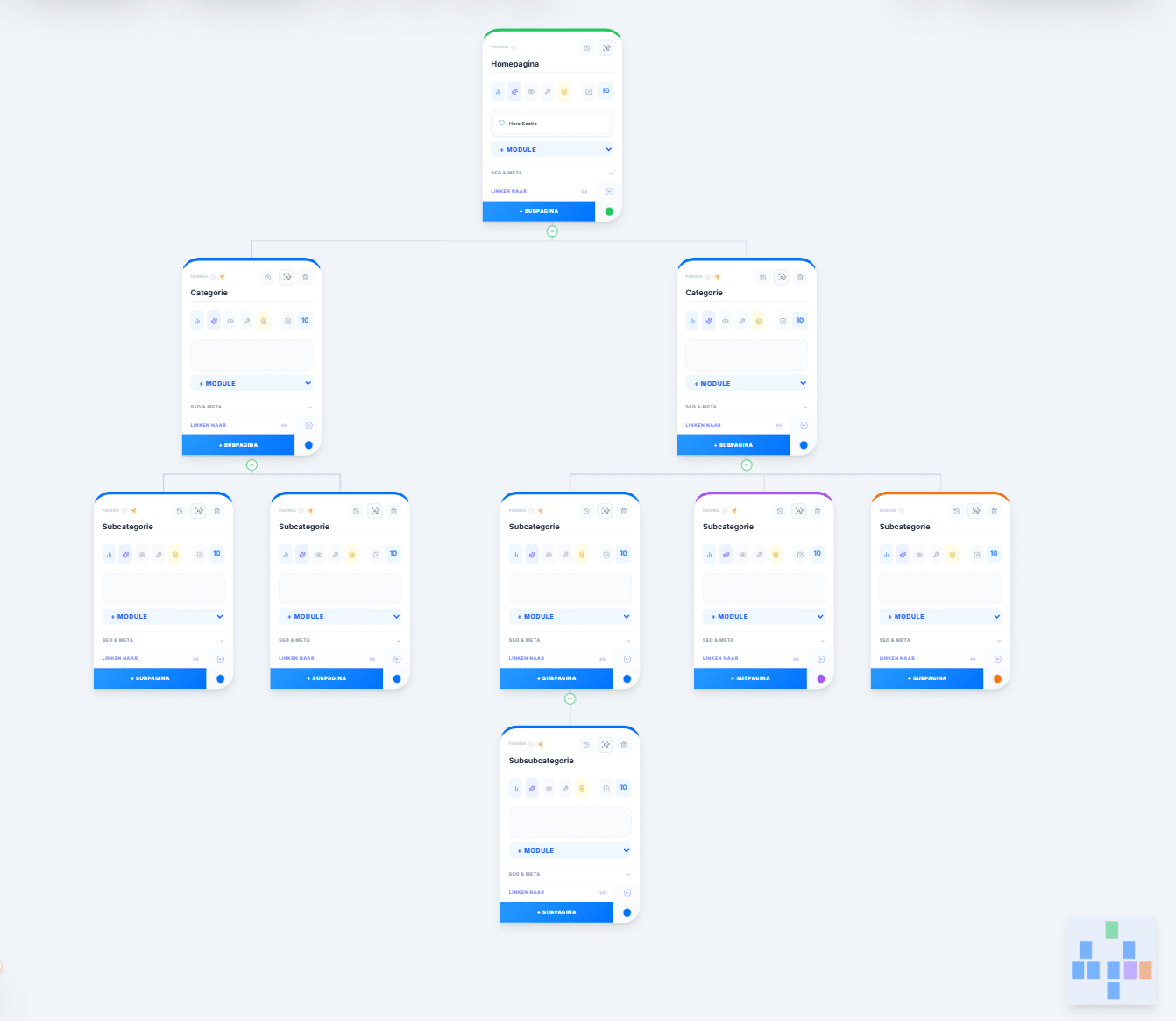
Bringing structure and hierarchy to your website and setting priorities: which pages do you tackle first? What is essential and what is secondary? Which pages do you lead your users to?
Translating keyword research into pages and content clusters that are connected to each other. These internal links are good for users and crawlers.
Setting up navigation across different pages in a smart way. Perfect for optimising your UX and SEO performance. The better users find their way around your website, the longer they stick around.
Building pages from standard modules with contact forms, CTA sections, Google reviews, service overviews and heading structures.
Setting out the outlines of your website clearly. Aligning strategy, copy, design and development. Communicating flawlessly with different parties, both internally and externally.
Avoiding duplicate content or an overgrowth of keywords and pages by creating a structured wireframe of your website.
A new project for your visual sitemap
Ready to start with our sitemap generator? Click the “Start new project” button in the menu. Fill in all fields: project name, the person responsible for the project, an icon and a colour. Briefly describe the context of your website.
Is your website already connected to Google Search Console? Then enter the GSC domain, so our tool automatically retrieves all data for analysing and monitoring existing URLs.

A visual sitemap for your new or existing website
A completely new website
When building a new website you always start with extensive keyword research: which keywords are relevant to your business, how do you want to be found in Google, which topics do you write pages about?
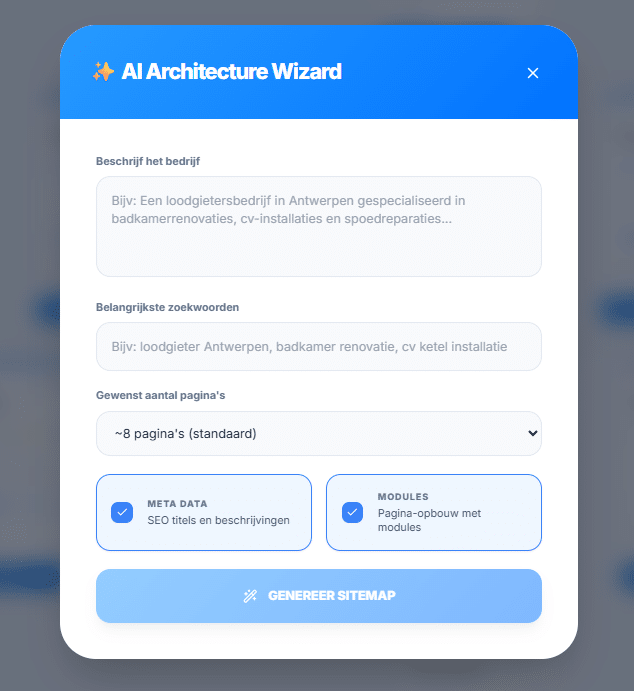
After that you get to work on keyword mapping and an SEO-friendly website architecture. Either you draw up a diagram yourself, or you choose the AI Architecture Wizard. Describe your business and add the most important keywords. Select the number of pages you want to write, optionally with meta data and standard modules.
The result: a proposal for your new website architecture. Ideal as a basis to expand later, or to adopt as it is.
Optimising your existing website
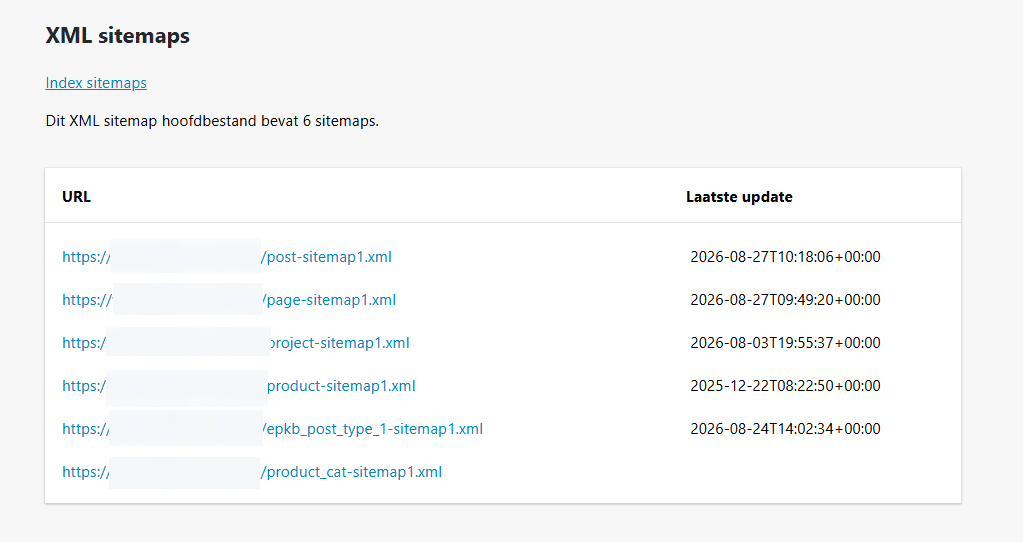
The website of your company has been online for a few months or years. Possibly not every page ranks the way you had in mind. The first step is then to make an overview of all URLs that are online. You find these in your sitemap.
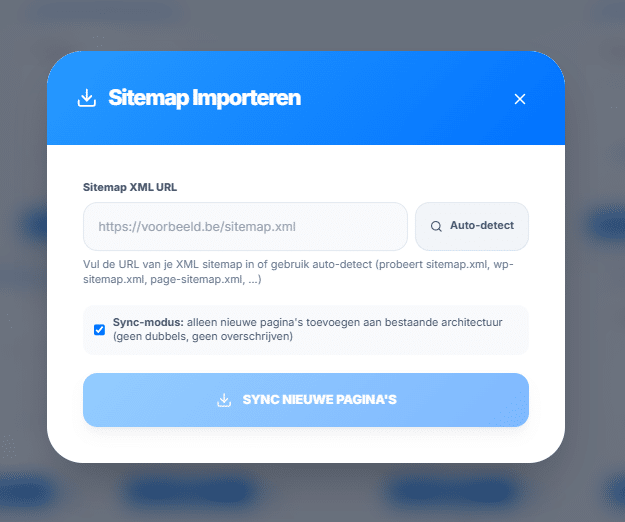
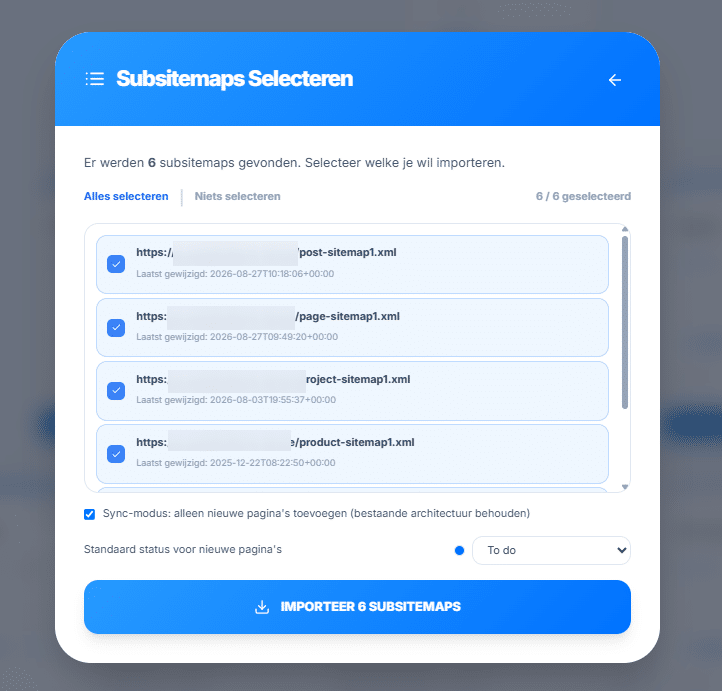
Import your current sitemap into our visual sitemap builder. You get a list of all sub-sitemaps, the categories into which all pages are divided. Select which parts you want to add and which status all pages get automatically (to do, already online, ready to publish…).
The overview of your existing pages is ready to be adjusted or expanded with new topics.
Our sitemap generator: an SEO tool tailored to your needs
Building a website that is clear and also ranks in Google: that takes knowledge and expertise. For this, Digital Climax developed a practical all-in-one SEO tool, the Architect. A dashboard in which you build websites and their structures yourself, write pages and later analyse them too. No separate apps or programmes, no SEO knowledge required.
One page per topic
Connect to Google Search Console or import your keyword research. Then map all your keywords: one clear focus per URL. Are your users looking for a specific answer? Then it is immediately clear to Google which page fits. No more risk of orphan pages or URLs that are never found.
User-friendly
Pour your website hierarchy into a clear tree structure. Main pages stand out visually and the relationship with subpages is clear at once. Move topics around easily with drag and drop. At a glance you see possibilities for content clusters and internal links. Track down duplicate content and orphan pages and decide faster which page backlinks are relevant for.
Support where needed
Starting from scratch is often the hardest step. With the AI Sitemap Wizard you generate a first structure based on a short description and a few keywords. AI keyword mapping in turn helps you with relevant keywords.
Focus on search intent
Decide in advance whether it is a commercial or an informational page. That way you know exactly what you want to say and in which direction you send your user. Use fitting CTAs such as ‘book your demo’, ‘get your quote’ or ‘get advice’. No morekeyword cannibalisation, duplicate topics or missing search intents.
Easy to share
Share your sitemap (and any wireframes) with copywriters, developers or clients in a clear format. Even for beginners it is clear what the hierarchy of your website looks like. Set priorities together and decide which topics are missing. The final XML export or WordPress file forms the basis of your (new) website and adjusted strategy.
Customer journey as a guide
Decide in advance which paths a user takes through your website. From informational content to commercial steps, from general products to specific items. That way you guide your visitors from orientation to conversion without friction. Let copywriters, marketers, designers and developers think along at a high level. That way fewer corrections or adjustments will be needed afterwards.
SEO expert cases
This is what our SEO experts did
From impossible to find to revenue machine
At our first meeting this client was nowhere to be found for relevant keywords. We got to work with an extensive analysis and drew up a tailor-made plan.
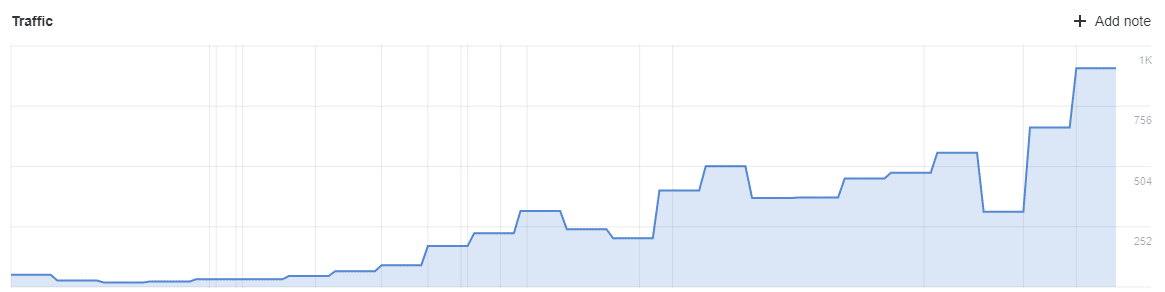
Today the website attracts more than 1,000 visitors a month. Plenty of interesting leads, but above all extra orders, mean this campaign helps the client grow.


Top position in Google
To bring more customers to their business we got to work on SEO. We had a new website built and focused on good visibility from step 1. We guide you from A to Z for great results.
In the figures below, from the past 3 months, you see the effect of a well-thought-out SEO strategy. We spend no advertising budget but still attract plenty of new customers with SEO.

Want to map out your website visually? Rely on Digital Climax
After all these years, can you no longer see any structure in your current website? Or are you looking for something to hold on to for your new one? Then our visual sitemap builder is the right tool. No knowledge needed, easy to use and ideal as a go-to dashboard, both internally and externally.
We gladly share our knowledge and experience as an SEO agency. Give your website the foundation it deserves and let it grow the way it should.
Curious about the possibilities for your business? Our experts are happy to think along with you. Whether you run a large company with international markets or you are a local retailer looking for more online visibility, with our Architect tool you get started with full confidence.
Discover our other user-friendly tools for your new or existing website
- Tool for SEO research: get insight into relevant keywords and decide on the right SEO strategy to work them into your website
- Tool for writing website copy: get started yourself with handy modules, standard sections and AI support
- Tool for converting copy into export files: avoid mistakes when publishing new content
- Tool for analysing your existing website: discover how well your website ranks and get insight into new opportunities and optimisations
- Tool for creating a webshop: choose a professional e-commerce website, based on data instead of gut feeling
- Tool for mapping your technical SEO health: help with detecting and solving technical SEO problems
- Analysing and optimising SEO processes: communicate easily with other parties, improve your workflow, prevent mistakes and save time