Remove content from Google
Why remove search results from Google?
You'd remove a search result from Google because not every page or article belongs in the search engine. Sometimes you want a result gone because the article is outdated, contains wrong information, or the page simply shouldn't be found in the search results. There are 2 ways to keep your page from being included in Google:
- Remove your search result from Google manually via Google Search Console
- Use a noindex tag
Remove your search result from Google with Google Search Console
Step 1
Add your website to Google Search Console
Step 2
In the menu on the left, under Index, you'll find ‘Removals’. Go to that option.
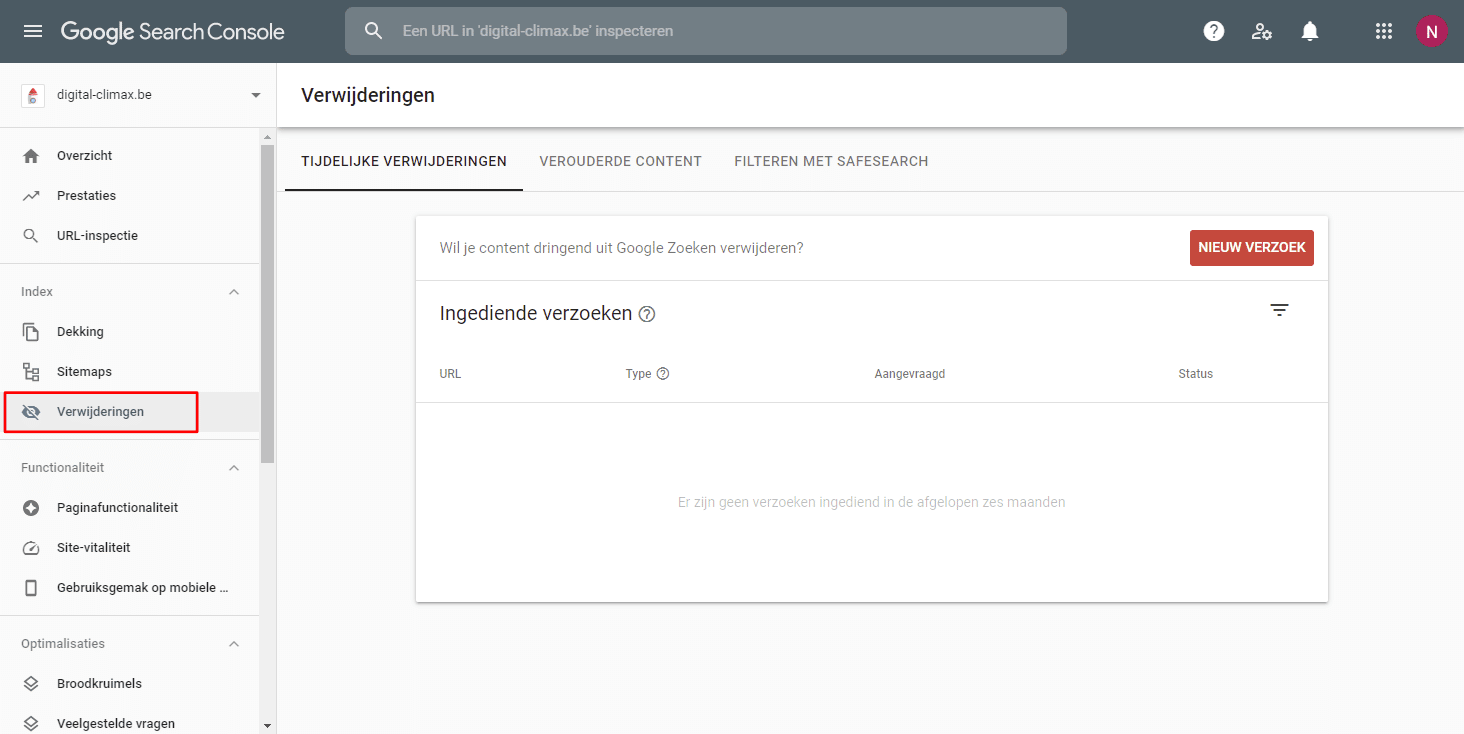
Step 3
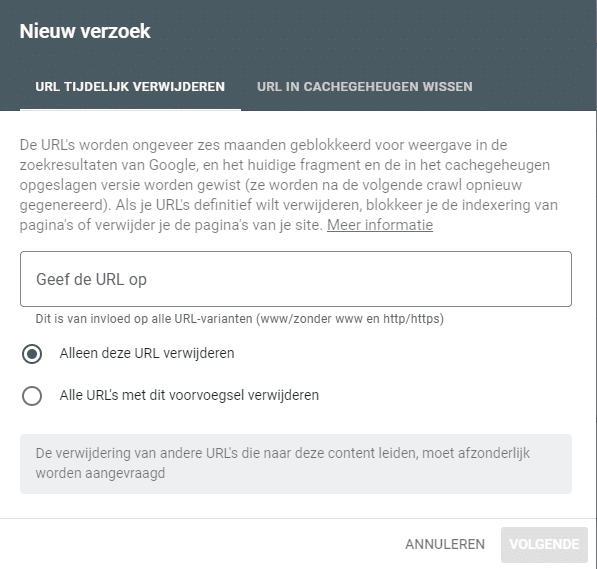
Create a new request to remove a search result from Google, using the URL of the page you want removed.
Google recommends removing the page from both the search results and the cache. You can also choose between the following options:
- Remove this URL only from the search results: this one speaks for itself. The URL you entered will be removed from the index.
- Remove all URLs with this prefix: this option is a bit more technical and less commonly used. It removes all URLs that start with a certain prefix.
Step 4
Submit your request
Note: Removing a URL from Google this way lasts about 6 months. So it's only a temporary fix. Want to keep a URL on your website but remove it from Google for good? Then keep reading.
Keep a page out of Google's search results with a noindex tag
Don't want your page to show up in Google's search results? A few steps are all it takes to keep it out of Google.
In some cases, it's useful if Google leaves your page out of the search results:
- Behind-the-scenes pricing pages
- Internal information
- Terms and conditions
- Outdated or incorrect information in your content
You can stop Google from showing your page in the search results with a noindex tag. It's a small piece of code that you add to your page.
A noindex tag tells Google that this page shouldn't be included in the search results. Depending on how your website is built, you have to add this tag manually. On WordPress websites, you can use an SEO plugin.
If you have to add the noindex tag to your HTML code by hand, it looks like this:
<meta name=”robots” content=”noindex, nofollow”>
Add this snippet to your HTML, and your search result won't be included in Google.
Remove search results from Google with robots.txt
A final, more technical option is to block access to your page in your robots.txt file. That tells Google's crawlers they're not allowed to crawl a certain page. As a result, they can never (or no longer) index the page, and it will disappear from the search results.
Note: Make sure you know what you're doing if you want to remove search results from Google with robots.txt. It's easy to make mistakes and, for example, remove your entire website from Google. Which, in most cases, is exactly what you don't want.
Which option is best for removing your search result from Google?
Removing your page with Google Search Console tells Google to take your page out of the search results. That's handy when, for example, you notice that a page shouldn't be available to regular searchers at all. On average, it takes about a day before your removal request actually takes effect. So it's a quick way to remove your search result from Google.
Just remember that Google Search Console only removes your page from the search results temporarily. Afterwards, you'll still need to get to work with a noindex tag or your robots.txt file.
Which search results can you remove from Google?
You can only have search results removed that you manage yourself. For the steps above, you need access to the website's Google Search Console or to the website's actual files.
Want search results from another website removed? Then contact the people who manage that website and show them the steps they need to take.
So you can't just remove anything you like from Google. You need actual access to the website itself or to Google Search Console.